TiTo v1.10.0 released
Published: October 24, 2024
TiTo is a time tracker tool for managing time spent on various projects.
TiTo runs directly in the browser and stores all data locally.
Download TiTo here: https://bjornkennethholmstrom.wordpress.com/tito/
and follow the installation instructions.
Features added in latest update:
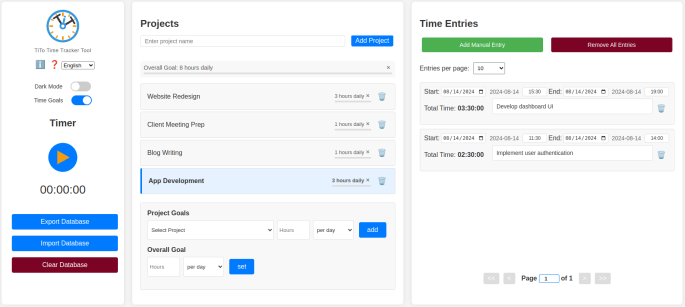
- Time goals
More features:
Dark mode
A clean three-column layout
Multilingual support (English, Swedish, Spanish and Basque)
Support for screen reader and keyboard navigation (tested with Orca in Chrome on Linux Mint)
Help modal
Info icon for quick access to app info and links
Start and stop a timer for active time tracking
Add manual time entries
Create and manage multiple projects
Drag-and-drop interface for reordering projects and time entries
View and edit time entries
Paginated time entries list with customizable entries per page (5, 10, 20, 30, custom, or all)
Editable page number for quick navigation through time entries
Charts displaying time spent on different projects:
- Overall time distribution
- Time spent in selected time ranges
Monthly and weekly report features with export to CSV, PDF and markup
Date range selection for detailed data analysis
Local data storage using IndexedDB
Import/Export of database from/into .JSON-file for backup and transfer
Offline functionality – works entirely in the browser
Upcoming features
Customizable report templates
More data visualization
More languages, per request
TiTo as browser extensions
App for mobile/tablet
Screenshots:
See more screenshots on the project page